Employee Self-Service: A Modern HR Portal That Works for Everyone
How a self-service HR portal takes routine work off HR’s plate: letting employees manage their own profiles, check leave balances, find notifications, and stay informed without asking for help.
S
SimpleHR Team
SimpleHR
The best HR tool is one employees barely have to think about, until they do. When an employee can update their own phone number, check how many vacation days they have left, or see that their leave request was approved, they stop emailing HR for the small stuff. That’s self-service, and it pays off for everyone.
Here’s what a practical self-service portal looks like, and why it makes HR’s life easier instead of busier.
Give employees ownership of their own profile
A profile page is where an employee keeps their own information current. The trick is deciding what they can change and what stays locked down, and a good portal draws that line clearly.
Information
Employee can edit?
Notes
Name, profile image, date of birth
Yes
Click Edit to change
Email (primary)
No
Read-only; set by admins
Contact & emergency contacts
Yes
Edit mode required
Benefits & IDs (SSN, bank, insurance)
Yes
Encrypted at rest
Employment details
No
Managed by admins
Leave allocations
View only
Granted by managers/admins
Let employees manage their own security
Rather than filing tickets, employees can change their own password and manage two-factor authentication from their profile. If 2FA is enabled for the company and email is configured, enabling it sends a verification code; disabling requires confirming the password.
One-click awareness
Employees can also see their leave balance right on their profile, with no guessing, no asking HR, no “can you check how many days I have left?” messages.
Make the dashboard a personalized home base
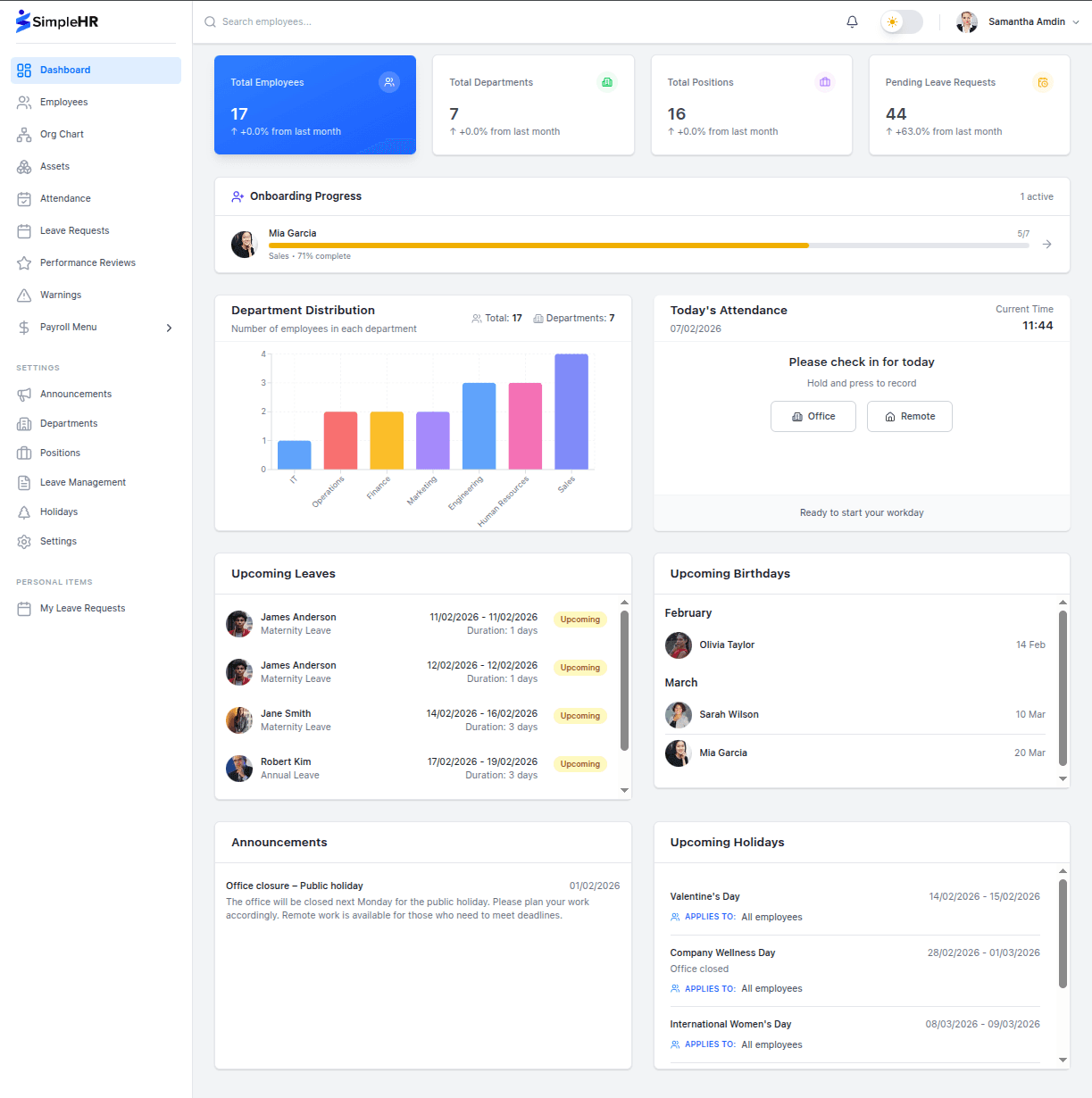
After login, everyone lands on a dashboard tailored to their role. Employees get the attendance check-in widget, upcoming holidays and birthdays, announcements, and their key stats. Managers and admins additionally see company-wide numbers and onboarding progress.
Because widgets follow the modules you’ve enabled, the dashboard only ever shows relevant, working features; if leave is turned off, the leave widget simply isn’t there.
Let notifications do the chasing
Self-service doesn’t work if people have to go hunting for updates. A centralized notification system puts everything in one place: leave approvals, document expiries, onboarding tasks, announcements, and performance reviews.
In-app bell: unread count badge with recent, clickable notifications.
Push & PWA: optionally real-time web push so updates arrive even when the app isn’t open.
Read/unread: mark individually or all at once; delete old ones to keep it tidy.
An employee shouldn’t have to ask what happened to their request. The notification should already have told them.
Frequently asked questions
Can employees change their own email address?
No. The primary email is read-only and managed by administrators; it’s tied to login and notifications.
What can employees update without help?
Their profile image (no edit mode needed), name, date of birth, contact details, address, emergency contacts, and their own security settings like password and 2FA.
How do notifications reach employees in real time?
By default the app polls for updates on a configurable interval. If web push is enabled, real-time browser push notifications are delivered instead, with automatic fallback to polling.
Do employees see company-wide dashboards?
Employees see a personalized view (their attendance, upcoming events, announcements). Admins see additional company-wide stats and analytics.
The bottom line
A self-service portal moves the routine work to the people it belongs to: employees keep their own details current and see their own balances, while notifications keep everyone informed automatically. The result is a lighter inbox for HR, and an experience that feels a lot less like a chore for everyone else.