HRIS, HRMS, and HCM sound the same but are not. Here is how these HR system categories differ, which one to look for, and why the label matters less than the features.
S
SimpleHR Team
SimpleHR
Try to compare HR systems and you will meet three acronyms that look interchangeable: HRIS, HRMS, and HCM. Understanding what each one means saves you from paying for the wrong tool or ruling out a good one because of a label.
The short version
Term
Stands for
Core focus
HRIS
Human Resources Information System
Employee data and records
HRMS
Human Resources Management System
HRIS plus payroll and time tracking
HCM
Human Capital Management
Talent, people, and workforce strategy
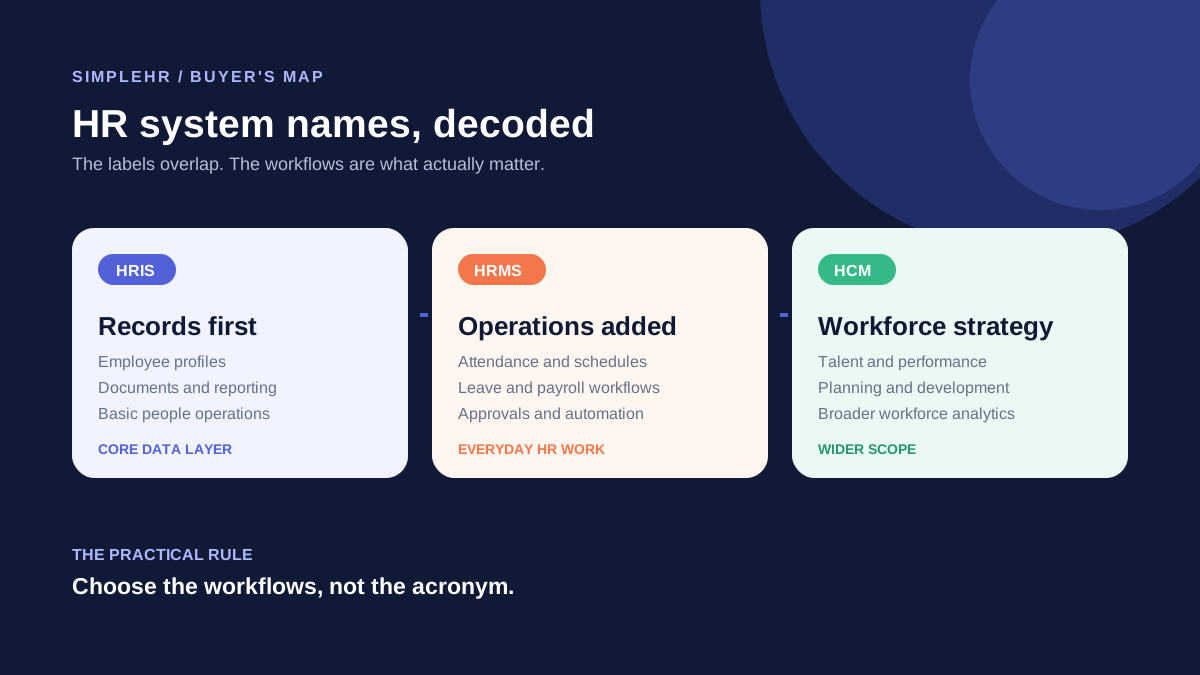
Think of them as layers. An HRMS usually includes everything an HRIS does and adds payroll and time. HCM is the broadest term, covering the full employee lifecycle from recruiting to retirement.
HRIS: the records system
An HRIS is the database at the center of HR. It stores employee profiles, personal and employment details, departments, positions, and documents. If a tool is mainly about keeping an organized employee directory and records, it is an HRIS.
Employee profiles and contacts
Departments, positions, and organization charts
Document storage
Basic reporting
HRMS: adds payroll and time
An HRMS layers operational tools on top of the records system. In addition to the employee database, it typically includes attendance tracking, leave management, payroll, and time-off processing. This is what most businesses actually want: records plus the day-to-day workflows.
If you hear vendors promise both a central directory and built-in payroll and leave, that is an HRMS in all but name.
HCM: the people-strategy layer
HCM, or human capital management, is the broadest category. It covers the whole employee lifecycle, including recruiting, performance reviews, talent development, and workforce planning. Enterprise HCM suites are powerful but often far more than a small team needs.
Do not let the label decide
Vendors use these terms loosely, and one company’s “HRMS” can overlap another’s “HCM.” Base your choice on the actual feature list you need, not the acronym on the marketing page.
Which one should a small business choose?
For most small and mid-sized teams, a solid HRMS is the sweet spot: employee records, attendance, leave, and payroll in one system. You get the day-to-day tooling without the complexity and cost of a full HCM suite.
Frequently asked questions
Is an HRIS enough for a small business?
Often yes when you mainly need records, but you will soon want attendance, leave, and payroll too. A tool that covers those as well tends to save the most time.
What is the difference between HRMS and payroll software?
Payroll software only handles pay. An HRMS includes payroll but also stores employee records, tracks attendance, and manages leave in the same system.
Do I need an HCM system?
Usually only larger organizations with advanced talent programs do. If you are a small team, an HRMS covers what you need with less cost and complexity.
Why do vendors use the terms interchangeably?
Because the boundaries have blurred as products add more features. Check the actual module list instead of trusting the acronym.
The bottom line
HRIS, HRMS, and HCM describe layers of an HR system, from records to day-to-day management to talent strategy. For most small businesses, an HRMS with records, attendance, leave, and payroll is the practical choice.